
|
title: Put the knife down and take a green herb, dude. |
descrip: One feller's views on the state of everyday computer science & its application (and now, OTHER STUFF) who isn't rich enough to shell out for www.myfreakinfirst-andlast-name.com Using 89% of the same design the blog had in 2001. |
||||||||||||||||
|
FOR ENTERTAINMENT PURPOSES ONLY!!!
Back-up your data and, when you bike, always wear white. As an Amazon Associate, I earn from qualifying purchases. Affiliate links in green. |
|||||||||||||||||
x
 
MarkUpDown is the best Markdown editor for professionals on Windows 10. It includes two-pane live preview, in-app uploads to imgur for image hosting, and MultiMarkdown table support. Features you won't find anywhere else include...
You've wasted more than $15 of your time looking for a great Markdown editor. Stop looking. MarkUpDown is the app you're looking for. Learn more or head over to the 'Store now! |
|||||||||||||||||
| Sunday, March 01, 2026 | |||||||||||||||||
|
Okay, I hit a rabbithole today. I'm not saying it's not fun, but probably not my smartest use of time. Long story shorter than I want, I find myself googling "SSMS equivalent on macOS" fairly often, meaning [Microsoft] SQL Server Management Studio, the Windows-specific tool you use not simply to manage SQL Servers via a GUI, but to throw raw T-SQL at it and view the results. It's barely changed since at least the 1990s. I used to use SQuirreL-SQL on Mac a lot when I dabbled (and also worked!) in Java, which really came in handy once when my boss didn't realize we were installing a Java app dbms onto a Linux-only network, and I briefly enjoyed Azure Data Studio until it got 86'd.
It would probably still work great, but it's frustrating that yet another MS tool got tossed into a VS Code extension. Look, VS Code is cool, but it's not an IDE. It feels like chicken wire and duct tape on a good day. And the last thing I want to do is have MORE things living in this single scripting app. I like dedicated apps, for heaven's sake. But you know what I've done for nearly thirty years now? Written apps that interface with SQL Server! Why don't I just write my own query client for SQL Server! Ah, but with what UI? Originally, I figured why not just the console? In an hour or so, I got a pretty simple client up that would send queries and parse up results into columns of plain text. Not too shabby! My introduction to TUIsBut was that enough? Of course not! We need a true console app, whatever that is, that intelligently formatted results and allowed complex SQL edits, not just line by line input. I started by wading into Spectre Console which allows you to style console text like mad and even has some neat widgets like this table, but it also says it's not really about complex UI management:
Also all its widgets are output-minded, not truly interactive. Okay, fine. Fair. Next up was Terminal.Gui, which seems to be a modern, C#-powered take on the sort of 1980s style DOS apps that you still find in backwater DMVs and tax preparer offices (I'm seeing a TurboTax commercial running during Celtics-76ers making fun of just such a UI now). Which is awesome! Except it was immediately buggy on macOS, and even when I got that working, the first text editing widget I tried allowed text entered to bleed into the widget under it. So that's a mess. Next? I've played with C#'s Insanely. It's insanely tough. I've copiloted the heck out of this today, and, you know, it turns out writing a text editor in a console is a pita. The toughest part? You have to manage all the scrolling. And since you're in a console, you lose all the built in cursor movement... if you want to insert instead of overwrite, that takes some work. And if you want to go to the end of the line, well, the macOS Terminal eats command-right arrow (which means "end") and uses that combo as a shortcut to go to the next terminal window instead. Solutions? Well, rather than reinvent the wheel, I find that
I'm starting to see why vi was born. Though apparently I'm also learning Emacs now too (the above shortcuts are the same in Emacs, maybe?). So throw those in. Awesome! A little esoteric, but that'll do, pig. Except the Meta ones aren't working... Guess what?!
[thanks GPT-5 mini] And there you have it. That's a lot learned today. Not sure I needed the history lesson or to write a scrollable text view for a rich console app, but I've taken on both, nonetheless. Labels: c#, console, macOS, SQL Server posted by ruffin at 3/01/2026 10:09:00 PM |
|||||||||||||||||
| Thursday, June 10, 2021 | |||||||||||||||||
|
I was following a video from Pinal Dave called "Who Dropped Your Table?" and was getting a message that, "Currently, this report does not have any data to show, because default trace does not contain relevant information." I googled for the reason why and guess what? The first hit (and answer) was on sqlauthority.com:
And now I too can tell who dropped tables on my database. (I do worry a little that enabling this might be a significant performance hit, but I just set it on my local dev machine for now. The answer to who messed things up will, here at least, always be me. Hopefully!) Labels: noteToSelf, SQL Server posted by ruffin at 6/10/2021 09:13:00 AM |
|||||||||||||||||
| Wednesday, December 20, 2017 | |||||||||||||||||
|
From SQL Authority with Pinal Dave:
A neat trick. After setting this up, you type a table name, highlight it, hit Ctrl-3 (or whatever you set up), and poof, the top 100 rows are up in Query Analyzer (or I guess it's all just SSMS these days). Labels: noteToSelf, SQL Server posted by ruffin at 12/20/2017 10:03:00 AM |
|||||||||||||||||
| Tuesday, October 10, 2017 | |||||||||||||||||
|
I had no idea T-SQL's From How to use ROW_NUMBER() to enumerate and partition records in SQL Server - CodeProject:
The full list is here, at docs.microsoft.com. Here's a taste...
Labels: noteToSelf, SQL Server, t-sql posted by ruffin at 10/10/2017 07:26:00 PM |
|||||||||||||||||
| Monday, January 02, 2017 | |||||||||||||||||
|
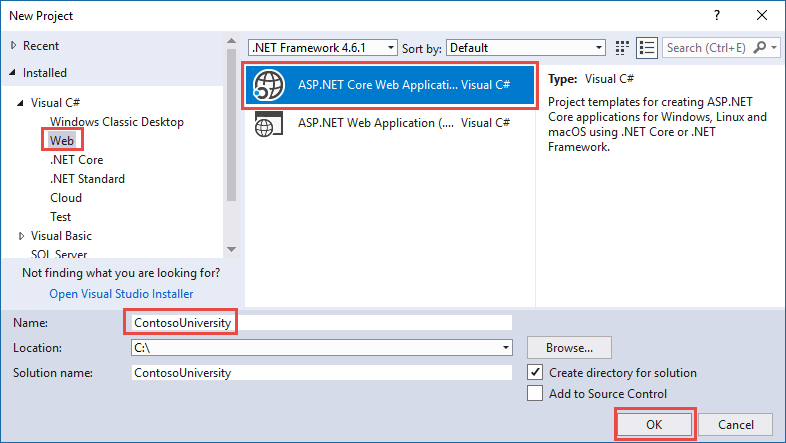
Argh. Fun day of setting up LocalDB. First, you have to have it installed. Unfortunately, our friend http://downloadsqlserverexpress.com/ is busted, and one of the more promising links from MSDN is busted too. If I'm remembering correctly, the new location seems to be here: But the real sticking point for me is that the default connection string for LocalDB from the Web App Template in Visual Studio 2015U3 -- at least if you've installed LocalDB from SQL Server Express 2016 -- doesn't work. The real pain was that I trusted the template, but SQL Server Management Studio was working with LocalDB just fine. Here are the steps I used to create the solution... From microsoft.com:
Now if I did everything correctly (yes, I took the default name instead of changing it to ContosoUniversity, for instance), here's the appsettings.json file's connection string that came out of that template... ... and here's what actually works... It's just an extra backslash, as far as I can tell. Not sure how I could've introduced that, but perhaps I did? I ended up getting the correct format from here, which is the github repo for the completed Contoso U example I referenced earlier. Enjoy. Your Labels: noteToSelf, SQL Server, visual studio posted by ruffin at 1/02/2017 03:34:00 PM |
|||||||||||||||||
| Friday, April 29, 2016 | |||||||||||||||||
|
I've done these enough now that I'd would've thought I'd have accidentally memorized it already, but thanks to the ease with which you can learn the exact syntax of any concept stuck if your head with a half-second of googling, I hadn't yet. Anyhow, SQL Server object checks are pretty easy. All you need to know is...
|
|||||||||||||||||
| Monday, March 07, 2016 | |||||||||||||||||
|
One thing I've constantly wondered about with ORMs is why they use different mental models than SQL, the thing they're almost always abstracting. We hire for SQL proficiency, but then immediately throw it away with complex edge case stuff. You know, like LEFT OUTER JOINs. /sarcasm From MSDN:
Yes, you heard that right. To perform a left outer join, you perform an inner join into a join table, then fill that join table in with default (null?) values if there's no inner join match. Wth? Their example: I'm tempted just to write a view and use that instead. This is stupid. The syntax really should be... I don't get it. I wonder how hard it'd be to write an extension that does that... Labels: ef, noteToSelf, SQL, SQL Server posted by ruffin at 3/07/2016 11:34:00 AM |
|||||||||||||||||
| Monday, February 29, 2016 | |||||||||||||||||
|
If you've been using Visual Studio, but bounce in and out of SQL Server Management Studio, and all of a sudden hitting F5 is opening up a file selection dialog asking where you want to save your *.rpt file, I think I know what happened. Did you just search for something? Argh, annoying. Labels: noteToSelf, SQL Server posted by ruffin at 2/29/2016 02:33:00 PM |
|||||||||||||||||
| Friday, February 19, 2016 | |||||||||||||||||
There are times that the Intellisense for SQL Server Management Studio gets horribly out of sync with what's in the database now, especially when you're creating new databases and/or scads of tables with SQL. I'm not sure why that'd be, as you'd think the Intellisense within a SQL client would be able to keep up with changes made by that same client, for heavens sake, but it often-to-usually doesn't. Wish I'd known about this cache refreshing sooner. Labels: noteToSelf, SQL Server posted by ruffin at 2/19/2016 12:50:00 PM |
|||||||||||||||||
| Tuesday, November 24, 2015 | |||||||||||||||||
|
You can find 'em here: https://msdn.microsoft.com/en-us/library/ms190324.aspx Or read 'em from that page here: type char(2) Object type: Applies to: SQL Server 2012 through SQL Server 2016. So to check if a table exists (from here): IF OBJECT_ID('TableName', 'U') IS NOT NULL
DROP TABLE TableName;
Voila. QED. Or something like that. And just to complete what I was fiddling with today, here's how to create the two different types of ids, autoincrementing INT (or other INT type) and GUIDs: TableId [uniqueidentifier] CONSTRAINT DF_SerialID DEFAULT newsequentialid(), -- GUID, natch ... or... TableId INT IDENTITY(1,1), -- INTige Labels: noteToSelf, SQL, SQL Server, t-sql posted by ruffin at 11/24/2015 09:03:00 AM |
|||||||||||||||||
| Thursday, June 04, 2015 | |||||||||||||||||
|
I was trying to install SQL Server Express so I wouldn't have to connect to our dev database, but ran into the dreaded "Setup account privileges" issue (image above, I think). If you're having this problem installing SQL Server Express, I can't guarantee that you're going to get great news here, but this is how you'd fix it if you could... You can open the Local Security Policy interface (or the Group Policy editor) and add the permissions you're missing from there, but the buttons to add to the ones I needed were disabled for me, even though I'm an admin on my box.
This is apparently known as the HasSecurityBackupAndDebugPrivilegesCheck rule. The best "how to nuke this issue" I found was from this kb article from MS:
Now that'll do it. Well, unless you can't. I can't.
PRIVILEGES INFORMATION

Privilege Name           Description                        State
==============           ===========                        ========
SeIncreaseQuotaPrivilege Adjust memory quotas for a process Disabled
SeSecurityPrivilege      Manage auditing and security log   Disabled
...
SeBackupPrivilege Back up files and directories Disabled
...
Argh. Oh well. It's always a little painful when you have enough power to really get your box into trouble, which I do, but then you can't install something that'd actually help you do your job, making things better for everyone. /sigh But if I could've installed Express, that's how I could've fixed the SeDebugPrivilege, SeBackupPrivilege, etc issue. (Note that using Labels: noteToSelf, SQL Server posted by ruffin at 6/04/2015 11:58:00 AM |
|||||||||||||||||
| Thursday, April 02, 2015 | |||||||||||||||||
|
Getting the text of existing sprocs is apparently pretty easy:
Voila. I've been having trouble with ordering the results of a stored procedure, probably by putting results in a temp table. Seeing, in this case, the code to create the temp table the sproc's giving back should be useful. Although, in my case, no dice. I ended up cheating and trivially rewriting the sproc and the sproc it called.
So a quick change there... ... and I'm working. (Or I could have just overwritten spgetcompositejobinfo with one that sorted different, but that's obviously destructive, and usually A Very Bad Idea.) Labels: sproc, SQL, SQL Server posted by ruffin at 4/02/2015 11:23:00 AM |
|||||||||||||||||
| Wednesday, May 01, 2013 | |||||||||||||||||
|
SQL Network Interfaces, error: 26 - Error Locating Server/Instance Specified - SQL Protocols - Site Home - MSDN Blogs: [Update May 2009] My collegue found a good tool online which could be very helpful for users to isolate issues related to this error message. You can download PortQry from http://support.microsoft.com/kb/832919, run "portqry.exe -n yourservername -p UDP -e 1434". If this command returns information and it contains your target instance, then you can rule out possiblity 4) and 5) above, meaning you do have a SQL Browser running and your firewall does not block SQL Browser UDP packet. In this case, you can check other issue, e.g. wrong connection string. [bold mine -mfn] Between that and sqlcmd -L from our buddy, The SQL AUTHORITY!!!1! , my latest SQL Server fun hasn't been quite as excruciating as it could've been. Labels: noteToSelf, SQL Server posted by ruffin at 5/01/2013 10:26:00 AM |
|||||||||||||||||
| Thursday, November 29, 2012 | |||||||||||||||||
|
USE MyCurrentDatabase GO SELECT t.name AS table_name, SCHEMA_NAME(schema_id) AS schema_name, c.name AS column_name FROM sys.tables AS t INNER JOIN sys.columns c ON t.OBJECT_ID = c.OBJECT_ID WHERE c.name LIKE '%MyColumnName%' ORDER BY schema_name, table_name; FTW. Straight from THE SQLAUTHORITY. Sounds a little like an accusatory panel. Labels: noteToSelf, SQL Server posted by ruffin at 11/29/2012 02:24:00 PM |
|||||||||||||||||
| Wednesday, February 22, 2012 | |||||||||||||||||
|
Aka, "Where did all my changes go, and why does this trigger's creation only work in sqlplus?" Roland Bouman's blog: Oracle SQL Developer 1.1 Supports MySQL: Sorry, that was a PEBKAC (Problem Exists Between User And Chair) More on how autocommit works in Oracle from an Ask Tom segment here (from 2000! though last updated this month). I've always used SQuirreL-SQL when using Oracle to this point, and this hasn't been an issue. Very non-SQL Query Analyzer. Old habits die hardest, I guess. Labels: oracle, problem solved, SQL Server posted by ruffin at 2/22/2012 11:09:00 AM |
|||||||||||||||||
| Monday, January 21, 2008 | |||||||||||||||||
|
SQL Server Express ist evil. Authentication Mode (SQL Server Express): If you select Windows Authentication, Setup creates an sa account that is disabled by default. To use Mixed Mode Authentication and activate the sa account after Setup completes, see the How to: Change Server Authentication Mode and ALTER LOGIN (Transact-SQL) topics in SQL Server 2005 Books Online. But wait, there's more. http://msdn2.microsoft.com/en-us/library/ms188670.aspx If Windows Authentication mode is selected during installation, the sa login is disabled. If you later change authentication mode to SQL Server and Windows Authentication mode, the sa login remains disabled. To enable the sa login, use the ALTER LOGIN statement. This is probably the best sum of what's got to go on to get JDBC working with SQL Server Express Edition 2005 when you use a named instance (say SQLEXPRESS) rather than a default on port 1433. Sql Express is going to be a good match for the Sql Server 2005 JDBC provider, it is free, it is relatively easy to set up and deploy and it has all the power of Sql Server 2005 for low end applications. Note from the code he gives that your connection string for, say, SQuirreL SQL, would be... jdbc:sqlserver://localhost\SQLEXPRESS You won't need a port because the SQL Browser will provide it for you, I think. It works, anyhow. Labels: FUN, jdbc, SQL Server posted by ruffin at 1/21/2008 06:25:00 PM |
|||||||||||||||||
|
| |||||||||||||||||


|
All posts can be accessed here: Just the last year o' posts: |
|||||||||||||||||||||
|
||||||||||||||||||||||

|

|

|
About Our Author