
|
title: Put the knife down and take a green herb, dude. |
descrip: One feller's views on the state of everyday computer science & its application (and now, OTHER STUFF) who isn't rich enough to shell out for www.myfreakinfirst-andlast-name.com Using 89% of the same design the blog had in 2001. |
||||||||||||||||||||||||||||||||||||||||||||||||||||||||||||||||||||||||||||||||||||||||||||||||||
|
FOR ENTERTAINMENT PURPOSES ONLY!!!
Back-up your data and, when you bike, always wear white. As an Amazon Associate, I earn from qualifying purchases. Affiliate links in green. |
|||||||||||||||||||||||||||||||||||||||||||||||||||||||||||||||||||||||||||||||||||||||||||||||||||
x
 
MarkUpDown is the best Markdown editor for professionals on Windows 10. It includes two-pane live preview, in-app uploads to imgur for image hosting, and MultiMarkdown table support. Features you won't find anywhere else include...
You've wasted more than $15 of your time looking for a great Markdown editor. Stop looking. MarkUpDown is the app you're looking for. Learn more or head over to the 'Store now! |
|||||||||||||||||||||||||||||||||||||||||||||||||||||||||||||||||||||||||||||||||||||||||||||||||||
| Sunday, December 11, 2022 | |||||||||||||||||||||||||||||||||||||||||||||||||||||||||||||||||||||||||||||||||||||||||||||||||||
|
In the last post, we discussed how to set up a Preact project by importing Preact and HTM libraries in "1999-style JavaScript" to help us understand how to modernize a legacy client codebase and/or introduce modern templating conventions to developers who have never used them before. This pattern allows us to get a componentized paradigm up and running without any serious overhead. Nobody will ask, "What is npm?" or "Why isn't webpack working?" Using Preact and HTM allows for a perfect simplest case, introducing nothing beyond what's immediately needed, but being able to deploy immediately, if that's the goal. But we only got so far, with one simplest-case component in a static system. Let's make things a little more complicated,
WARNING: I'm posting this in reverse chronological order so they appear correctly in the blog, which lists the most recent first. Read more » Labels: css, howto, javascript, preact, tutorial posted by ruffin at 12/11/2022 08:07:00 AM |
|||||||||||||||||||||||||||||||||||||||||||||||||||||||||||||||||||||||||||||||||||||||||||||||||||
| Monday, August 22, 2016 | |||||||||||||||||||||||||||||||||||||||||||||||||||||||||||||||||||||||||||||||||||||||||||||||||||
|
Tell you what, being an independent shop has its drawbacks. One is that it's hard to be good at design and zeroes and ones. There are certainly people great at both, but it's much fewer than those who are really good at just one or the other. That's nearly a truism. That means it's taken me days to get my website looking presentable over and above my cheaping out and using a template for the site. One of the biggest issues for me was trying to get a grid of application features to look good in both desktop and mobile modes. I've got a pretty common set of three features and an image for each. On the desktop, the bootstrap grid arrangement is simple enough:
But when I go to mobile, I want the order to change fairly drastically.
Probably makes more sense with numbers...
Changes into...
That's kind of an extreme change. First attempted solutionI wasted a lot of time trying bootstrap push and pull. Look at this answer, for instance.
Look at the first Wrong. After fiddling around a while, pushes seem to simply push off to the right of the viewable row. And this question pretty much confirms it. Second solutionSince that question suggests that we can't push and pull, I figured I'd take one of these more complicated options. They boil down to...
The first makes more sense I think, though you end up having to duplicate code. I ended up with code like what's below. What's important to note is that the first row is It does get the effect I want, even if it's not DRY. I don't like it, though I don't even know that it isn't what a bootstrap master would do to get the same effect. I do know that any idealistic setup seems to go completely out of the window once your use case gets complicated enough, whether with conventional code or with CSS. ChartigeHere's a chart of the different "down" and "up" classes to hide your stuff, though it's from the version 4 alpha...
posted by ruffin at 8/22/2016 11:37:00 AM |
|||||||||||||||||||||||||||||||||||||||||||||||||||||||||||||||||||||||||||||||||||||||||||||||||||
| Wednesday, August 17, 2016 | |||||||||||||||||||||||||||||||||||||||||||||||||||||||||||||||||||||||||||||||||||||||||||||||||||
|
Man. I tried to create responsive images today, and it was more trouble than I would've expected. I think the biggest problem for me was a long detour through Here's an example: That's it. Excellent, though not quite great, tutorial on creating responsive images here at MDN. Biggest win? Now my screenshot changes when I tip my phone from portrait to landscape and back. Observe! Landscape on iOS (iPhone 5 size)
Portrait on iOS (iPhone 5 size)
RapidWeaver Theme Removes ALL br Tags. Rly.Now to figure out how to get that content centered for mobile portrait in the RapidWeaver theme I'm using (called Offroad). Hit a really nasty snag today where whoever made the theme -- a pack-in for the RapidWeaver application, no less -- decided they'd erase all Can you spot it? Of course you can. It's the I changed it a bit to make it less invasive, but still, REMOVING EVERY Everything seems happier now. Labels: coding, css, rapidweaver posted by ruffin at 8/17/2016 08:08:00 PM |
|||||||||||||||||||||||||||||||||||||||||||||||||||||||||||||||||||||||||||||||||||||||||||||||||||
| Wednesday, April 06, 2016 | |||||||||||||||||||||||||||||||||||||||||||||||||||||||||||||||||||||||||||||||||||||||||||||||||||
|
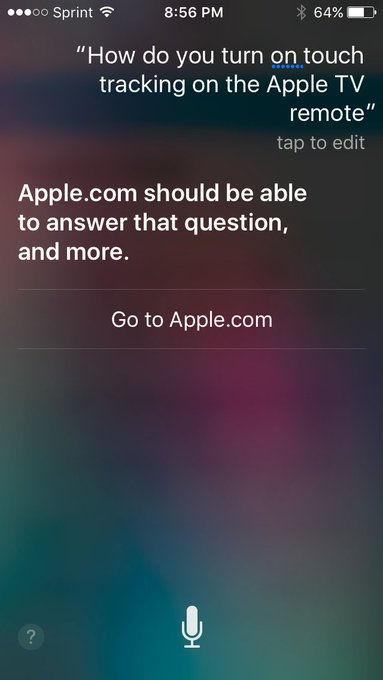
The Apple TV remote apparently underwent a change in the most recent update. Used to be that you could just touch the Apple TV remote's trackpad, and you started tracking. Not so any longer. That just pops up a little hint that if you fully click the pad you'll jump forward or back 10 seconds, depending on where your finger is. Annoying. I couldn't find a quick workaround, so I was telling Siri, "Fast forward 15 minutes," and "Rewind 20 mins". What a freaking pain.
They set me up with a phone call, which is to say they routed me to a web page where I set up a phone call. The call went well, actually. Tara (?) knew exactly what I was talking about, and had had the same think happen to her with her Apple TV. "I am in Netflix, in case that matters." "No, what do you think I'm doing when I get home? Exactly that." The answer was to pause what you're watching. Then, and only then, will you be able to use the "Touch Surface Tracking". Anyhow, long story a touch shorter, check out the spacing in this survey form I was sent to fill out the next day: Wow. Just wow.[1] Check out that "Next" button down at the bottom. Do designers not get to use this on 27" iMacs? I mean, I like things that work on lowest common denominator, but shouldn't somebody test in a larger monitor? Finding the culprit wasn't too difficult. See that hard-coded Ouch. That's not what you want. Just change those two to 200 and 180 and you get... I know, I know, now there's the chance that some pages are taller than others. You can either make the original pane as large as you need for your busiest screen (not great, unless you're careful with how big the UI gets or scroll for questions that are exceptionally long), or you could just move the Next and Submit buttons to the top of the page and let it bounce from frame to frame. You can argue that these two alternatives are wrong for whatever reason, and I'm sure there's a better option, but it'd be hard to argue what they have right now is right. Ouch. I mean, I know they have good people at Apple. I recall looking at the source in iCloud once to see how they were doing their calendar and seeing a hidden job advert with an ASCII art cloud with a smiley face in it. Now it looks like they're removed it, but that's a cute touch, and the web version of Calendar is actually pretty good. Ask me, I'd know. If I'd been willing to move to CA right now, I would've applied. [1] Yes, this from a guy whose blog has been hard-coded to 600px seemingly since the invent of the Internet. posted by ruffin at 4/06/2016 12:07:00 PM |
|||||||||||||||||||||||||||||||||||||||||||||||||||||||||||||||||||||||||||||||||||||||||||||||||||
| Friday, September 13, 2013 | |||||||||||||||||||||||||||||||||||||||||||||||||||||||||||||||||||||||||||||||||||||||||||||||||||
|
html - CSS: Understanding the selector's priority / specificity - Stack Overflow: A selector's specificity is calculated as follows: Winner winner. Labels: css, noteToSelf posted by ruffin at 9/13/2013 04:21:00 PM |
|||||||||||||||||||||||||||||||||||||||||||||||||||||||||||||||||||||||||||||||||||||||||||||||||||
| Tuesday, November 20, 2012 | |||||||||||||||||||||||||||||||||||||||||||||||||||||||||||||||||||||||||||||||||||||||||||||||||||
|
ErieStuff: CSS cascade - Which declaration takes priority?: Which CSS declaration takes priority when one property is declared multiple times with different values? If equal in priority, what declaration has the highest specificity? And finally, in which order of sources are declaration prioritized if declarations are equal in priority and specificity? I think the one that caused me the most trouble was, "3. Count the number of attributes, class names and pseudo-classes. The highest score wins!" If you simply create a class and slap it on a tag, you could have a tag-specific class of rules that easily overrides the class. The key is specificity. So in my case, .dayshift wasn't showing up on an li tag until I made a li.dayshift {... class. There were other classes on the li that took precedence over the .dayshift class that wasn't tag-targeted. Capiche? Labels: css posted by ruffin at 11/20/2012 01:21:00 PM |
|||||||||||||||||||||||||||||||||||||||||||||||||||||||||||||||||||||||||||||||||||||||||||||||||||
| Tuesday, August 14, 2012 | |||||||||||||||||||||||||||||||||||||||||||||||||||||||||||||||||||||||||||||||||||||||||||||||||||
|
It's a question we all wanted answered at one time or another. Why? So that we can programmatically create icons of whatever color we want without sitting in Paint for hours changing dot colors. (Edit: Okay, I have done the color block with background-matching gif/png with transparent middle before, but that still feel kludgey. I'm happy enough with this degrading to blocks on older-but-not-ancient browsers.) How to Create Circles with CSS | Bryan Hadaway's Web Tech Blog: Making circles with CSS3 is very simple, but not very well supported with older browsers. If your design depends on circles (and you need to accommodate users on older browsers) you should definitely use images instead. I wanted icons then text, and the below works (spacing's a little weird so it'll fit in the blog design). There's some extra stuff as I tried to figure out why IE9 wasn't playing nicely. Turns out it's the lack of a doctype at the top. Once it's there, it all worked. Not so lucky in Camino (essentially Firefox 3.6). <!DOCTYPE html>So here that looks like this (the first row is what I wanted)... Hello Hello (without spacing out) Hello Spam Labels: css posted by ruffin at 8/14/2012 06:30:00 PM |
|||||||||||||||||||||||||||||||||||||||||||||||||||||||||||||||||||||||||||||||||||||||||||||||||||
| Monday, May 23, 2011 | |||||||||||||||||||||||||||||||||||||||||||||||||||||||||||||||||||||||||||||||||||||||||||||||||||
|
Sure, pop-ups are evil -- if they're for advertisements. If they're to relay information from AJAX, perhaps not so much. ColorBox, a "customizable lightbox plugin for jQuery 1.3, 1.4, & 1.5" is a pretty good widget for in-window pop-up feedback. But what's the minimum code I could use to display this jive? Glad you asked... 1 <html>You must also have an includes folder that looks something like this...  Enjoy. Labels: code, css, dhtml, problem solved posted by ruffin at 5/23/2011 11:59:00 AM |
|||||||||||||||||||||||||||||||||||||||||||||||||||||||||||||||||||||||||||||||||||||||||||||||||||
| Sunday, April 20, 2008 | |||||||||||||||||||||||||||||||||||||||||||||||||||||||||||||||||||||||||||||||||||||||||||||||||||
|
And here I was naive enough, coming back to web dev after a brief academic hiatus, to believe that the browsers had converged enough to think the design horrors of 2000 were over. No such. If there's one thing I'd like to see implemented, it's this text-shadow CSS property that the w3c proposed quite some time ago. Here's a page at w3c with "Readable White Text" using the property. Below, I'll include the code that should do the same thing. This should have a shadow. Without Safari, though, you're likely not seeing it -- or you're from THE FUTURE.*sigh* Just for fun, here's what you should be seeing, taken from Safari on Windows:  A little bigger now for effect...  That's really a pretty nice effect. Mozilla had a bug filed for its lack of support in 1999. With any luck, it appears it may have, within this weekend, finally gotten a patch. I tried the nightly build (2008042004) on my Mac, however, and no dice. Here's the best workaround I can find for IE. This should have a shadow. But only on IE, regardless of whether you're from THE FUTURE or not. Unless it's STEVE BALLMER'S FUTURE, where every browser is IE.Not only does it stink visually, it inexplicably seems to require a style value for height. Here's a picture for the IE challenged.  And the code. Note the difference between using "text-shadow" and the "Direction" and "Strength" jive for the IE "filter". <!-- w3c's Way (Safari only right now) --> <center> <div style="background-color:blue;padding:10px;width:70%;text-align:left"> <h3 style="color:white; text-shadow: black 0.1em 0.1em 0.2em;"> This should have a shadow. Without Safari, though, you're likely not seeing it -- or you're from THE FUTURE. </h3> </div> </center> <!-- Microsoft's Way (IE only right now, and likely forever) --> <center> <div style="background-color:blue;padding:10px;width:70%;text-align:left"> <h3 style="color:white;height:100px;filter:progid:DXImageTransform.Microsoft.Shadow(color='#666666', Direction=225, Strength=4)"> This should have a shadow. But only on IE, regardless of whether you're from THE FUTURE or not. Unless it's STEVE BALLMER'S FUTURE, where every browser is IE. </h3> </div> </center> EDIT: Some play in the search for a solution. Better yet, works towards a possible patch for Firefox, with a test build. posted by ruffin at 4/20/2008 09:25:00 PM |
|||||||||||||||||||||||||||||||||||||||||||||||||||||||||||||||||||||||||||||||||||||||||||||||||||
|
| |||||||||||||||||||||||||||||||||||||||||||||||||||||||||||||||||||||||||||||||||||||||||||||||||||




|
All posts can be accessed here: Just the last year o' posts: |
|||||||||||||||||||||
|
||||||||||||||||||||||

|

|

|
About Our Author