One feller's views on the state of everyday computer science & its application (and now, OTHER STUFF) who isn't rich enough to shell out for www.myfreakinfirst-andlast-name.com
Using 89% of the same design the blog had in 2001.
FOR ENTERTAINMENT PURPOSES ONLY!!!
Back-up your data and, when you bike,
always wear white.
As an Amazon Associate, I earn from qualifying purchases. Affiliate links in green.
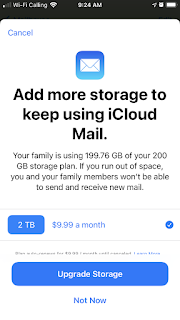
Guess who else is selling me services? You got it. Google. Well, specifically Gmail.
That look familiar?
But Google allows me to "learn more" with the weird hamburger straw menu.
Let's give that a shot.
Wait, okay, that's actually kind of helpful! has:attachment larger:10M is a neat search suggestion to get rid of some oversized emails.
Unfortunately I only have 125 that match. That's not nothing -- 125 at even just 10 megs each is well over a gigabyte, giving me nearly 8% of my 15 gigs of free space back and hopefully silencing this message for a while.
But what really hits me is the coincidence that Apple and Google are both yelling at me to pay something [or pay more in Apple's case] at the same time.
Interestingly, Outlook seems to hard cap at 50 gigs even when you're paying $70 a year (includes 1 tb OneDrive). Google offers 100 gigs in gmail for $20 a year. Apple lets you lump email in with your iCloud, so potentially 2 terabytes (!??!), but that's shared with your iCloud backups, messages, and pictures, and runs $10 a month, so... Fastmail charges $5 a month for 30 gigs and $9 for 100, which seems to be obviously too much until you recall they aren't profiting on what's in your emails.
Regardless, what getting caught on both ends with "upgrade now!!1!" adverts tells me is that companies aren't scaling storage over time, as it becomes cheaper for them. And storage isn't being updated year over year because having people run out of storage is a profit center.
Not crazy, but not coincidental either. This is a decided, "let's all charge for services" play by all the companies. There's money in them thar hills.
With all this autocomplete in Gmail and Outlook, do you suspect it's mining my composition to suggest completions for me? For others? If I tab, is that a training point?
(That one's pretty innocuous, but I complained in Outlook that the suggestions were so long it was slowing me down... I was composing as I typed and reading through the suggestions to see if they were better. They weren't. They only wasted my time.)
I mean, of course they're stealing our labor, right? Even though I'm just a coder, my English degree doesn't appreciate what this blog called [in this case talking about captchas and Street View ids for Google]...
... yet another ruse devised by Google to make you train their robots for free
I recently bought a domain for personal email and was going to try it out with Fastmail as the host. This kinda pushes up the timetable on that experiment [he said as he typed into his Google-hosted blog].
Edit: This one's a little better example of robo-suggesting (and is actually what I was going to write), though still not nearly as bad as what I got in Outlook, which was nearly writing my email itself.
I'm in a spot where Thunderbird is probably the best way I can access Exchange, and I'm fairly happily using ExQuilla. My only complaint is the inability to send encrypted emails, but that's not a huge deal, since those aren't all that common.
But I'm also using the active Ericsson branch of Lightning as an extension to get my calendar, and things aren't nearly so consistent. Just this morning, the calendar tab told me it had 43 queued jobs. That's not great. (I'm not quite resisting the urge to say that I have 43 queued jobs, but... ain't one.) I also couldn't send mail while I was waiting, as "Write" was greyed out. I eventually quit. And yesterday, I had to hard-quit Thunderbird from the Task Manager when it wouldn't close all the way -- the windows were gone, but the process was still running. That's happened a handful of times after a Dismiss button issue (see below).
I ascribe most of this weirdness to Lightning, which might not be fair, but there was a check in just a few hours ago, and the fact that the Dismiss button doesn't work reliably really bugs me. I don't care if you haven't successfully updated the server yet. How about keep that reminder window closed for the running app. It should be easy to take the Dismiss request and keep your inability to update Exchange silent, or displayed in a less intrusive way. Is it really that difficult to keep a list of ids for events you should now ignore?
Btw, to the folks who clip their nails at work (I'm looking at you too, RMS) like the two dudes who do it in the current office, please heavens stop. I'm irrationally fearful of one of them dropping into my coffee. I mean, unless you're just passive-but-very-aggressively poking at someone, at least take it to the bathroom, right?
Is there any way to "paste as quotation" in Outlook 2011 for Mac?
According to Guruprasad Ra, a "Support Engineer" (so he likely knows better than most), apparently not. Sure, you could write a macro, but that takes some googling & there's no guarantee that wouldn't require a lot of testing (the one above is apparently buggy after 2003).
I have no idea how Outlook 2011 was released. Honestly, Microsoft should have put all their engineers on creating a connector for Exchange and then bought a great email client already released for the Mac -- or even just tweaked and rebranded Thunderbird. That'd be some interesting MS PR.
No, I can't say I use Hotmail much for "real" email these days. Great spam bucket, though.
Looks like Outlook.com thinks Camino is a mobile browser (or, rather, it sees it's not supported and goes to the mobile interface). Sad. Of course, Camino is pretty much dead now, so it's not a huge deal. I like it as my alternative browser at work for Gmail and, well, Blogger (the ctrl shortcuts (a, l, i, b) still work in Camino). Guess it won't be my Outlook interface.
Outlook on Chrome is pretty snappy -- much faster than Gmail, and has a more intuitive search interface, I think.
That said, it's sad that Gmail's archive of my mail goes back farther than Hotmail's, especially considering how I, like many that have a Hotmail account, I guess, used Hotmail years before Gmail was born.
The postings on this site are [usually] my own and do not necessarily reflect the views of any employer, past or present, or other entity. About Our Author