
|
title: Put the knife down and take a green herb, dude. |
descrip: One feller's views on the state of everyday computer science & its application (and now, OTHER STUFF) who isn't rich enough to shell out for www.myfreakinfirst-andlast-name.com Using 89% of the same design the blog had in 2001. |
|
FOR ENTERTAINMENT PURPOSES ONLY!!!
Back-up your data and, when you bike, always wear white. As an Amazon Associate, I earn from qualifying purchases. Affiliate links in green. |
|
x
 
MarkUpDown is the best Markdown editor for professionals on Windows 10. It includes two-pane live preview, in-app uploads to imgur for image hosting, and MultiMarkdown table support. Features you won't find anywhere else include...
You've wasted more than $15 of your time looking for a great Markdown editor. Stop looking. MarkUpDown is the app you're looking for. Learn more or head over to the 'Store now! |
|
| Wednesday, November 24, 2021 | |
|
I don't quite grok music streaming services. Sure, I understand that I get all the music IN THE WORLD!!!111 while I'm current, which is impressive, but that only works if I accept that I'd get tired of $7-10 of music each month or am happy paying $7-10 a month for life. (Amazon's service runs $7 a month if you have Prime.) Fair enough; there are many albums I'd listen to but regret buying, but would I get $7-10 a month of ever proverbial "joy" from that music? If your daily playlist churns less and you tend to buy for the long term, wouldn't it be better to own an album a month? I've made this argument on this site before. But there are really two issues, aren't there?
Spotify has apps for every platform. Apple Music famously even has an Android app. My mp3 files have... well, no great options for my phone or work computers. How do I get ubiquitous access to music files that I own?I used to use Amazon Music, which gives Prime users like me access to Amazon Prime Music streaming (the "free" subscription) and all the mp3 tracks you've purchased from Amazon, which lets you get around your favorites that aren't in the Prime Music library by... buying them. Seems fair, but you see the issues -- One, I have to buy all my music from Amazon going forward. Two, I can no longer add my own music files I had pre-Amazon. (I actually have 100 grandfathered tracks from when Amazon let you upload music, but that only goes so far.) I've also tried Foobar 2000 on iOS (direct app store link), which, wacky dated UI aside, works well, but requires that you have your files on the phone, iPod-style, which Apple makes prohibitively expensive. Thanks, Mr. Cook. Can I have an SD slot, please? Now, after a few failed experiments, I use Astiga, essentially a web-based third-party interface to music files you have in cloud storage. It's a competent app. It supports playlists, and gives you the normal Albums, Artists, Genres, and Songs lists. And it doesn't downsample afaict.  There are some foibles. My least favorite is that it sometimes splits albums into two for... I don't know. Small changes in id3 information? Different file types? (I have some AAC and mp3 mixes, I'm afraid.) But ultimately quote competent. For sources, it supports, at a minimum...
I've considered keeping a box running at home and SFTPing into it, but decided against. Instead, I've opened a pCloud account and gotten a little less than 10 gigs for free, I believe. With the exception that this isn't nearly enough space, it's worked great. I've added a throw-away OneDrive account too to get twice the songs, but OneDrive often requires a new login to keep Astiga's access current. pCloud has not. pCloud wins by about a mile. There's even an official Astiga Android app. There are also serviceable, though not great, pCloud apps for iOS and Android. Right now, I use CloudBeats on my phone. YMMV. Admittedly, I do use a throw-away email address and there's nothing on my pCloud other than music. I trust most online services and these apps about as far as I can throw them. I really wish I could give read-only access to specific folders in OneDrive, but for some reason what's there now doesn't quite suit. So Astiga and pCloud wins -- except for the lack of space. I listen to significantly more than 20 gigs of music regularly. pCloud has a paid tier of 500 gigs for $175 lifetime or 2 TB for $350, on sale for Black Friday for $122.50 and $245. On its face, this seems ludicrous. $123 to host files I own? Super. $123 is a lot of music (the "opportunity cost" in this equation), maybe 10-12 albums on Amazon (my cloud "alternative"), but it's also a great price for 500 gigs of online storage with plenty of throughput. I think I'm finally going to bite on the 500 gig plan. Again, I don't think I'd put anything particularly sensitive on pCloud, but I would load it up with music. It looks like I have just under 100 gigs of tracks on my "real" OneDrive account now, so that's lots of room to grow. And it would mean I could stop ripping at 256 and go full FLAC if I wanted, for instance. Looks like I'm back in the "Rip.  Labels: amazon music, Apple Music, cloud, music, pCloud, spotify posted by ruffin at 11/24/2021 12:24:00 PM |
|
| Wednesday, September 29, 2021 | |
|
Remember in April when I complained about how hard Apple is selling me services, and how it made it sound like I would lose email? Guess who else is selling me services? You got it. Google. Well, specifically Gmail.  That look familiar? 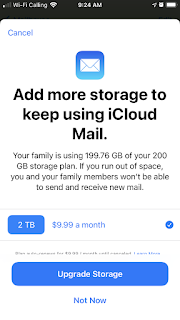 But Google allows me to "learn more" with the weird hamburger straw menu.  Let's give that a shot.  Wait, okay, that's actually kind of helpful! has:attachment larger:10M is a neat search suggestion to get rid of some oversized emails. Unfortunately I only have 125 that match. That's not nothing -- 125 at even just 10 megs each is well over a gigabyte, giving me nearly 8% of my 15 gigs of free space back and hopefully silencing this message for a while. But what really hits me is the coincidence that Apple and Google are both yelling at me to pay something [or pay more in Apple's case] at the same time. Interestingly, Outlook seems to hard cap at 50 gigs even when you're paying $70 a year (includes 1 tb OneDrive). Google offers 100 gigs in gmail for $20 a year. Apple lets you lump email in with your iCloud, so potentially 2 terabytes (!??!), but that's shared with your iCloud backups, messages, and pictures, and runs $10 a month, so... Fastmail charges $5 a month for 30 gigs and $9 for 100, which seems to be obviously too much until you recall they aren't profiting on what's in your emails. Regardless, what getting caught on both ends with "upgrade now!!1!" adverts tells me is that companies aren't scaling storage over time, as it becomes cheaper for them. And storage isn't being updated year over year because having people run out of storage is a profit center. Not crazy, but not coincidental either. This is a decided, "let's all charge for services" play by all the companies. There's money in them thar hills. Labels: apple, cloud, gmail, Google, hats o' money, icloud, outlook posted by ruffin at 9/29/2021 12:11:00 PM |
|
| Wednesday, January 27, 2021 | |
|
Remember Joel Spolsky's "Let Me Go Back" letter? I do. Microsoft, specifically Microsoft Office, doesn't.  I'm obviously trying to save the file to my local drive. And I obviously would prefer not to have to navigate that horrendous UI Word has now to move from OneDrive to my drive. For an app that still impressively honors old keystroke recipes -- like alt-I, B (alt-insert, break) to insert a page break -- this really offends me (haha) as a user. They are actively preventing you from saving to your drive. (This is not new. This is simply the first time I got aggravated enough to post.) This is not progress. This is a commercial for OneDrive.
Okay, as you might expect, this is almost fixable.  And this is heavenly by comparison...  ... but...
 Fewer keystrokes is better! Let me go back! Labels: cloud, hats of money, microsoft, microsoft fail, office, UI, usability, users posted by ruffin at 1/27/2021 10:05:00 AM |
|
| Thursday, March 03, 2016 | |
|
The reason I haven't used 1Password yet, though its auto-generated passwords have to be safer than what I'm using, is that you've...
Looks like 1Password just started showing the issues with 1.)... From a wrap-up on Michael Tsai's site:
The reply from 1Password makes some sense...
Fair enough, but, again, one mistake in their code means all of your danged passwords are out. If someone is sniffing your loopback, well, all your passwords and 1Password info is out. If they make this sort of mistake in moving things around the cloud, it's no longer a local machine issue. Use strong passwords, and keep your use of them to a minimum. Keep your laptops pretty clean and your home computers turned off when you're not using them. In short, be smart. Don't depend on a cloud service to be smart for you. posted by ruffin at 3/03/2016 10:00:00 PM |
|
| Sunday, August 05, 2012 | |
|
Here's what I think most people don't let themselves think about the cloud: Having your personal information online means anyone online has access to it. If you have your tax returns, Social Security card, and passport in your home, only someone in your home can get them. Digital information is available to anyone on the network where that info is stored. Thus Mat Honan's horror story where his computer, phone, and tablet (all Apple: Macbook, iPhone, iPad) are all locked and wiped remotely, with the hacker gaining his personal information, leading to the compromise of his business Twitter account, etc etc. You're almost better off on some level checking your email the old, POP3 way. Check your email online, pull it down, and have the server delete it. Back that up locally, and store another backup off-site periodically. Geography still matters. Geography still provides security, if you let it. I really enjoy being able to get pictures of family that I've emailed years ago immediately, but I don't need to do that with passwords, tax returns, and other personally identifying information. There should be a distinction made by the service. It should be harder than a simple password to get to emails with personal information. And it should be tougher than calling Apple support with personal information from Facebook (apparently how Honan's account was compromised; the hacker knew enough about Honan to talk the support tech into unlocking the account) to get to that info too. Where is the guy calling from? Does his voice match a voice fingerprint Honan willingly gave earlier? etc etc. Anyhow, here's a bit from Honan's "I was hacked" post describing what it's like. Worth reading. From Emptyage — Yes, I was hacked. Hard.: Here’s how I experienced it: EDIT: Wow, I've never seen so many stupid typos. Wth was I doing in August of 2012? Watching The Untouchables? posted by ruffin at 8/05/2012 02:36:00 PM |
|
| Tuesday, October 13, 2009 | |
|
From AppleInsider | Microsoft's Sidekick/Pink problems blamed on dogfooding and sabotage: "On the iPhone, you sync your data with your PC/Mac via iTunes, and MobileMe in parallel syncs both the iPhone and the PC/Mac with 'the cloud" [at MobileMe]. If the cloud were to go down and everything lost (like I said, an almost completely inconceivable occurrence except by deliberate sabotage), your data would still be preserved on both your iPhone and your PC/Mac," a source explained. So first, I guess we can say not only did MS screw Sidekick owners, so did the Danger folk that created a system without adequate backups. Ever since I started working with databases, I've said, "If you don't have your data three places, you don't have it at all." The iPhone apparently has this -- your home computer, the cloud (potentially), and your iPhone. Only a complete dope would have a cloud system where you could lose more than an hour's worth of data. Honestly, what's happened to Microsoft? Can we directly connect this to Gates leaving? This, the Pink fiasco, the Xbox 360 build issues, Windows Vista (which wasn't that bad an OS, imo, but has serious flaws. "I know/worked with Win2k. You, sir, are no Windows 2000."), the .NET mess whose core really doesn't improve on the techs that came before it in any impressive way (no matter how much I like C#)... who is driving their bus? I've thought for a while that Gmail was going to lose, say, three emails from 5% of their customers' accounts, and as people slowly discovered it, they were going to go ballistic. Never did I figure some cloud provider would screw up this badly. And if someone did, I would have expected Apple to do it, as they seem sometimes seem to be doing software dev on a shoestring and without the resources needed to match, well... it used to be "to match Microsoft," but I guess the king is dying a slow, painful death. (The latest OS on a shoestring move... (Appleinsider.com): Since Mac OS X 10.6 launched in late August, numerous reports online have detailed the issue, which is triggered by logging in and out of a guest account on a Snow Leopard machine. Upon logging back in to their regular account, users will find that it has been wiped of all data. How does Apple get away with this crap? Microsoft has had some security issues, but they usually only hit those who weren't careful with their computers. The SQL Server worm sucked, but even then those that got hit hardest weren't particularly sharp developers -- or at least not deliberate ones. This Snow Leopard account erasure bug strikes without any warning. You could have a computer unattached to the Internet and lose everything. And Apple doesn't have a quick fix released two months later? Shoe, meet string.) posted by ruffin at 10/13/2009 08:07:00 AM |
|
|
| |

|
All posts can be accessed here: Just the last year o' posts: |
|||||||||||||||||||||
|
||||||||||||||||||||||

|

|

|
About Our Author